View Encumbrance Certificate
Welcome, all! Ec Online Tamilnadu, View Encumbrance Certificate (EC) @ tnreginet.gov.in.
The Encumbrance Certificate (EC) service was launched by the Government of Tamil Nadu under the Inspector General of Registration Department. This service is specially made for Tamil Nadu residents who need to verify property legal status before buying or selling. The main purpose is to check if property has any loans, legal cases, or financial liabilities. Under this program, eligible users can get benefits like instant EC download, 30 years property history, and free online viewing. The EC shows all property transactions and helps you make safe property decisions. Till now, thousands of people have downloaded EC certificates online. The viewing process is completely online and free. You can check EC from home using mobile or computer. Let me explain everything step by step.
What is Encumbrance Certificate?
Encumbrance Certificate (EC) is super important when you’re buying or selling property. It basically tells you if the property is clean — meaning no loans, no legal cases, nothing hanging over it. This certificate shows the complete transaction history of any property for a specific time period.
Think of EC as a property health report. Just like you check medical reports before surgery, you must check EC before buying property. The certificate lists all transactions like sales, mortgages, gifts, or any legal charges registered against the property. If someone took a loan against the property or if there’s any court case, everything appears in the EC.
TNREGINET makes getting this certificate really easy and quick. You don’t need to visit Sub-Registrar Office anymore or wait in long queues. The entire process happens online in just few minutes, and you get instant results on your screen.
EC View Online Process
To view and download Encumbrance Certificate online through TNREGINET, follow these steps:
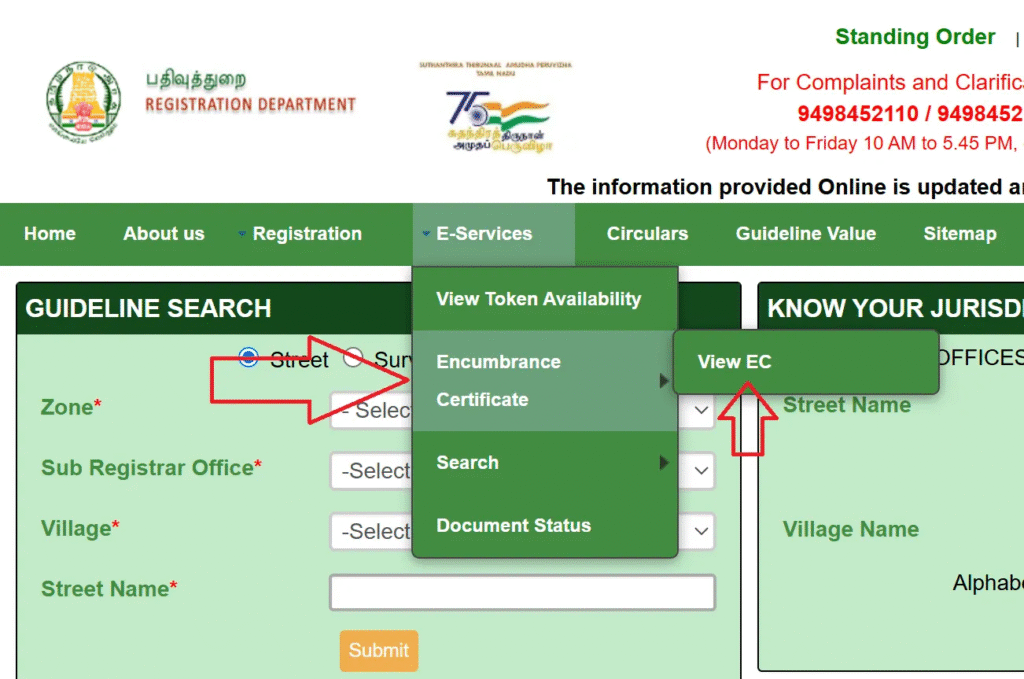
- Visit the official website at tnreginet.gov.in in your browser.
- Log in to your TNREGINET account using registered username and password.
- Look for the E-Services section on the dashboard.
- Click on Encumbrance Certificate option from the menu.
- You’ll see different search types available — choose one that suits your need.
- Select EC search type for standard property search.
- Enter the zone details from dropdown menu.
- Choose your district where property is located.
- Select the Sub-Registrar Office name that has jurisdiction over the property.
- Fill in the EC start date — the beginning of the period you want to check.
- Enter the EC end date — the closing date of the period.
- Type the village name where property is situated.
- Enter the survey number of the property accurately.
- Add subdivision number if applicable to your property.
- Type the captcha code shown on screen to verify you’re human.
- Click the Search button and wait few seconds for results.
- Your EC will appear on the screen with all transaction details.
- Review all the information shown in the certificate carefully.
- Click the Download button to save EC as PDF file.
- Save it on your device or take a printout for your records.
Important Tips for EC View: • Use only the official TNREGINET website for security • Keep your login credentials confidential • Double-check property details before searching • EC covers up to 30 years of property history • Save multiple copies of downloaded EC
The best part? You get the EC instantly. No waiting for days or weeks like the old system. The certificate shows all transactions for your chosen time period, and viewing is completely free.
Types of EC Search Available
TNREGINET offers three different search methods to make finding EC easier based on what information you have:
- EC Search: This is the standard method where you search using property details like zone, district, SRO, village name, and survey number. Use this when you know the complete property location.
- Document-wise Search: If you have a specific document number, you can directly search using that. This method requires: • Document registration number • Year of registration • Sub-Registrar Office name • This is faster when you have document reference
- Plot/Flat-wise Search: Specially designed for apartments and gated communities. You can search using: • Plot number or flat number • Building name • Apartment complex details • This helps when property is part of larger project
Choose the search type that matches your situation. Each method gives you the same detailed EC, just the search criteria differs based on what information you have available.
Documents Required for EC View
You need these details and documents for viewing EC online:
- For EC Search: • Property survey number (mandatory) • Village name where property is located • District name • Sub-Registrar Office jurisdiction name • Time period for EC (start and end dates) • Property subdivision number if applicable • Zone details of the property
- For Document-wise Search: • Document registration number • Year of document registration • Sub-Registrar Office name where registered
- For Login Access: • TNREGINET registered username • Account password • Valid email ID for notifications • Registered mobile number for OTP
- Additional Information Helpful: • Property owner names • Previous transaction details if known • Address proof of the property • Property tax receipt (for reference)
Understanding EC Certificate Details
When you view your Encumbrance Certificate online, it contains important information that you must understand properly. The certificate shows several key details that tell the complete story of the property.
The EC displays all transactions registered during your selected time period. Each transaction entry includes the document number, registration date, document type like sale deed or mortgage, names of parties involved, and the transaction amount. If property had any loans, you’ll see mortgage entries with bank names and loan amounts.
The certificate also shows if there are any legal charges or court orders registered against the property. These could be related to property disputes, unpaid dues, or legal cases. Any gifts, inheritances, or family settlements also appear in the EC with complete details.
One important thing — if the EC shows “NIL” or “No Encumbrance,” it means the property is clean with no transactions or charges during that period. This is good news for buyers as it indicates the property is free from legal complications.
EC Certificate Charges
While viewing EC online is free, there are nominal charges for certified copies:
• Online viewing: Completely free • Application fee: ₹1 per application • EC for 1 year: ₹30 • Each additional year: ₹10 extra • Computerized records since 1987: ₹100 • Certified copy download: Small additional fee • Payment through netbanking, UPI, or cards • Instant receipt generation after payment
The charges are very reasonable compared to the old system where you had to spend on travel, photocopies, and multiple office visits. Plus, online EC is available instantly while offline process used to take days or even weeks.
Benefits of Online EC View
This online EC service offers following benefits:
Instant access — get EC in few minutes instead of days • Free viewing — no charges for online viewing • 24/7 availability — access anytime from anywhere • No office visits — complete process from home • Secure platform — your data is protected with encryption • Historical records — check up to 30 years of property history • Multiple searches — search as many properties as needed • Accurate information — directly from government database • Easy download — save EC as PDF for future use • Transparent process — see all charges clearly • SMS notifications — get updates on registered mobile • Property verification — confirm property legal status before buying
Common Issues and Solutions
Sometimes users face problems while viewing EC online. Here are solutions to common issues:
Login Problems: If you can’t log in, check your username and password carefully. Use the Forgot Password option if needed. Make sure your account is active — login at least once every 3 months.
Search Not Working: Double-check all property details you entered. Survey numbers must be exact. Village names should match official records. Try different search types if one doesn’t work.
EC Not Displaying: This might happen if property details are incorrect or property is very old. Contact the Sub-Registrar Office helpline for assistance. Check if you selected correct time period.
Download Failed: Clear your browser cache and try again. Use updated browser version. Check your internet connection. Try downloading during non-peak hours for better speed.
Captcha Errors: Type captcha carefully — it’s case sensitive. Refresh the page to get new captcha if current one is unclear. Use good lighting to see captcha clearly.
Eligibility Criteria
You need to meet these criteria for viewing EC online:
• Must be Tamil Nadu resident • Property should be located in Tamil Nadu only • TNREGINET account must be active • Valid mobile number and email ID required • Property must have survey number and village details • Age 18 years or above for account registration • Basic knowledge of property location and details • Internet connection and device (mobile or computer) • Valid ID proof for TNREGINET registration • Property details should match official records
Conclusion
On this article, I have given the complete information about View Encumbrance Certificate online and I have also told how to view EC on TNREGINET, how to download EC certificate for free, and EC search types in complete step-by-step format in this article post. If you liked this article then definitely share it with your friends and family so they can also benefit from this online service. You can also read other government schemes on our site like property registration online, guideline value check, and stamp duty payment. If you have any questions or doubts, please comment below or contact helpline number 044-24640160. Thank you for visiting our article and best of luck for your EC download!
Frequently Asked Questions (FAQs)
Is EC viewing free on TNREGINET portal?
Yes, viewing EC online is completely free. You only pay nominal charges if you need certified copy for official purposes. Online viewing has no charges at all.
How many years of EC can I check online?
You can check EC for up to 30 years online through TNREGINET portal. Just enter your desired start and end dates while searching for the certificate.
Can I view EC without TNREGINET account?
No, you must have registered TNREGINET account to view EC online. Registration is free and takes only few minutes to complete on the portal.
What if property has no transactions during selected period?
The EC will show “NIL” or “No Encumbrance” which means property had no registered transactions during that time. This is actually good sign for buyers.
How long does EC download take?
EC download is instant once you complete the search. The system shows results in few seconds and you can immediately download PDF file to your device.
Can I get EC for property in another person’s name?
Yes, you can view EC for any property if you have correct property details like survey number and village name. Ownership doesn’t restrict EC viewing online.